Youflip Terms and Conditions
Draft under review
This is the version of Youflip's Terms and Conditions we are reviewing now. It may still change before it takes effect. Each part is also explained in the Help Center articles.
1. About Youflip
Youflip is a social e-commerce platform. It links sellers, service providers, apartment owners, real estate dealers and other businesses with the community, and lets people chat, call and share.
Youflip connects people; it does not sell, inspect or guarantee what others offer. We do not physically check any product, service, property or person listed on Youflip. Any deal is made directly between the buyer and the seller, and any loss from that deal stays with them, not with Youflip.
Youflip is an independent software and technology company. We are not a government body, we are not run by or on behalf of any government, and we have no political or government dealings anywhere in the world. Our aim is to help communication and e-commerce grow.
2. Accepting these terms
By creating an account or using Youflip, you agree to these terms. If you do not agree, do not use Youflip.
You must be at least 13 years old to use Youflip, and at least 18 to buy, sell, rent or advertise on the Marketplace.
If you use Youflip for a business, you confirm you are allowed to accept these terms for that business.
You must follow the laws of the country you use Youflip from, including laws on trade, property, advertising and consumer protection.
Youflip is offered in many languages. If a translation differs from the English text, the English version applies.
3. Your account and signing in
Your phone number is the main way you sign in to Youflip: we send a one-time code to it each time you sign in on a new device. Never share that code with anyone: Youflip staff will never ask for it.
Countries you can sign in from
When you sign in, you choose your country's dialling code before typing your number. Youflip currently supports phone numbers from 175 countries: all 54 countries in Africa, 27 in the Americas, 42 in Asia, 44 in Europe and 8 in Oceania.
| Continent | Country | Flag | Dial code |
|---|---|---|---|
| Africa | Algeria | 🇩🇿 | +213 |
| Africa | Angola | 🇦🇴 | +244 |
| Africa | Benin | 🇧🇯 | +229 |
| Africa | Botswana | 🇧🇼 | +267 |
| Africa | Burkina Faso | 🇧🇫 | +226 |
| Africa | Burundi | 🇧🇮 | +257 |
| Africa | Cameroon | 🇨🇲 | +237 |
| Africa | Cape Verde | 🇨🇻 | +238 |
| Africa | Central African Republic | 🇨🇫 | +236 |
| Africa | Chad | 🇹🇩 | +235 |
| Africa | Comoros | 🇰🇲 | +269 |
| Africa | Congo | 🇨🇬 | +242 |
| Africa | Côte d'Ivoire | 🇨🇮 | +225 |
| Africa | DR Congo | 🇨🇩 | +243 |
| Africa | Djibouti | 🇩🇯 | +253 |
| Africa | Egypt | 🇪🇬 | +20 |
| Africa | Equatorial Guinea | 🇬🇶 | +240 |
| Africa | Eritrea | 🇪🇷 | +291 |
| Africa | Eswatini | 🇸🇿 | +268 |
| Africa | Ethiopia | 🇪🇹 | +251 |
| Africa | Gabon | 🇬🇦 | +241 |
| Africa | Gambia | 🇬🇲 | +220 |
| Africa | Ghana | 🇬🇭 | +233 |
| Africa | Guinea | 🇬🇳 | +224 |
| Africa | Guinea-Bissau | 🇬🇼 | +245 |
| Africa | Kenya | 🇰🇪 | +254 |
| Africa | Lesotho | 🇱🇸 | +266 |
| Africa | Liberia | 🇱🇷 | +231 |
| Africa | Libya | 🇱🇾 | +218 |
| Africa | Madagascar | 🇲🇬 | +261 |
| Africa | Malawi | 🇲🇼 | +265 |
| Africa | Mali | 🇲🇱 | +223 |
| Africa | Mauritania | 🇲🇷 | +222 |
| Africa | Mauritius | 🇲🇺 | +230 |
| Africa | Morocco | 🇲🇦 | +212 |
| Africa | Mozambique | 🇲🇿 | +258 |
| Africa | Namibia | 🇳🇦 | +264 |
| Africa | Niger | 🇳🇪 | +227 |
| Africa | Nigeria | 🇳🇬 | +234 |
| Africa | Rwanda | 🇷🇼 | +250 |
| Africa | São Tomé and Príncipe | 🇸🇹 | +239 |
| Africa | Senegal | 🇸🇳 | +221 |
| Africa | Seychelles | 🇸🇨 | +248 |
| Africa | Sierra Leone | 🇸🇱 | +232 |
| Africa | Somalia | 🇸🇴 | +252 |
| Africa | South Africa | 🇿🇦 | +27 |
| Africa | South Sudan | 🇸🇸 | +211 |
| Africa | Sudan | 🇸🇩 | +249 |
| Africa | Tanzania | 🇹🇿 | +255 |
| Africa | Togo | 🇹🇬 | +228 |
| Africa | Tunisia | 🇹🇳 | +216 |
| Africa | Uganda | 🇺🇬 | +256 |
| Africa | Zambia | 🇿🇲 | +260 |
| Africa | Zimbabwe | 🇿🇼 | +263 |
| Americas | Anguilla | 🇦🇮 | +1264 |
| Americas | Antigua and Barbuda | 🇦🇬 | +1268 |
| Americas | Argentina | 🇦🇷 | +54 |
| Americas | Bahamas | 🇧🇸 | +1242 |
| Americas | Barbados | 🇧🇧 | +1246 |
| Americas | Bermuda | 🇧🇲 | +1441 |
| Americas | Brazil | 🇧🇷 | +55 |
| Americas | Canada | 🇨🇦 | +1 |
| Americas | Caribbean Netherlands | 🇧🇶 | +599 |
| Americas | Chile | 🇨🇱 | +56 |
| Americas | Colombia | 🇨🇴 | +57 |
| Americas | Costa Rica | 🇨🇷 | +506 |
| Americas | Dominica | 🇩🇲 | +1767 |
| Americas | Dominican Republic | 🇩🇴 | +1 |
| Americas | Ecuador | 🇪🇨 | +593 |
| Americas | Greenland | 🇬🇱 | +299 |
| Americas | Haiti | 🇭🇹 | +509 |
| Americas | Jamaica | 🇯🇲 | +1876 |
| Americas | Mexico | 🇲🇽 | +52 |
| Americas | Nicaragua | 🇳🇮 | +505 |
| Americas | Panama | 🇵🇦 | +507 |
| Americas | Paraguay | 🇵🇾 | +595 |
| Americas | Peru | 🇵🇪 | +51 |
| Americas | Puerto Rico | 🇵🇷 | +1 |
| Americas | United States | 🇺🇸 | +1 |
| Americas | Uruguay | 🇺🇾 | +598 |
| Americas | Venezuela | 🇻🇪 | +58 |
| Asia | Afghanistan | 🇦🇫 | +93 |
| Asia | Armenia | 🇦🇲 | +374 |
| Asia | Azerbaijan | 🇦🇿 | +994 |
| Asia | Bahrain | 🇧🇭 | +973 |
| Asia | Bangladesh | 🇧🇩 | +880 |
| Asia | Brunei | 🇧🇳 | +673 |
| Asia | Cambodia | 🇰🇭 | +855 |
| Asia | China | 🇨🇳 | +86 |
| Asia | Georgia | 🇬🇪 | +995 |
| Asia | Hong Kong | 🇭🇰 | +852 |
| Asia | India | 🇮🇳 | +91 |
| Asia | Indonesia | 🇮🇩 | +62 |
| Asia | Iran | 🇮🇷 | +98 |
| Asia | Iraq | 🇮🇶 | +964 |
| Asia | Israel | 🇮🇱 | +972 |
| Asia | Japan | 🇯🇵 | +81 |
| Asia | Jordan | 🇯🇴 | +962 |
| Asia | Kazakhstan | 🇰🇿 | +7 |
| Asia | Kuwait | 🇰🇼 | +965 |
| Asia | Lebanon | 🇱🇧 | +961 |
| Asia | Macao | 🇲🇴 | +853 |
| Asia | Malaysia | 🇲🇾 | +60 |
| Asia | Mongolia | 🇲🇳 | +976 |
| Asia | Myanmar | 🇲🇲 | +95 |
| Asia | Nepal | 🇳🇵 | +977 |
| Asia | Oman | 🇴🇲 | +968 |
| Asia | Pakistan | 🇵🇰 | +92 |
| Asia | Palestine | 🇵🇸 | +970 |
| Asia | Philippines | 🇵🇭 | +63 |
| Asia | Qatar | 🇶🇦 | +974 |
| Asia | Saudi Arabia | 🇸🇦 | +966 |
| Asia | Singapore | 🇸🇬 | +65 |
| Asia | South Korea | 🇰🇷 | +82 |
| Asia | Sri Lanka | 🇱🇰 | +94 |
| Asia | Syria | 🇸🇾 | +963 |
| Asia | Taiwan | 🇹🇼 | +886 |
| Asia | Tajikistan | 🇹🇯 | +992 |
| Asia | Thailand | 🇹🇭 | +66 |
| Asia | United Arab Emirates | 🇦🇪 | +971 |
| Asia | Uzbekistan | 🇺🇿 | +998 |
| Asia | Vietnam | 🇻🇳 | +84 |
| Asia | Yemen | 🇾🇪 | +967 |
| Europe | Albania | 🇦🇱 | +355 |
| Europe | Andorra | 🇦🇩 | +376 |
| Europe | Austria | 🇦🇹 | +43 |
| Europe | Belarus | 🇧🇾 | +375 |
| Europe | Belgium | 🇧🇪 | +32 |
| Europe | Bosnia and Herzegovina | 🇧🇦 | +387 |
| Europe | Bulgaria | 🇧🇬 | +359 |
| Europe | Croatia | 🇭🇷 | +385 |
| Europe | Cyprus | 🇨🇾 | +357 |
| Europe | Czechia | 🇨🇿 | +420 |
| Europe | Denmark | 🇩🇰 | +45 |
| Europe | Estonia | 🇪🇪 | +372 |
| Europe | Finland | 🇫🇮 | +358 |
| Europe | France | 🇫🇷 | +33 |
| Europe | Germany | 🇩🇪 | +49 |
| Europe | Hungary | 🇭🇺 | +36 |
| Europe | Iceland | 🇮🇸 | +354 |
| Europe | Ireland | 🇮🇪 | +353 |
| Europe | Italy | 🇮🇹 | +39 |
| Europe | Latvia | 🇱🇻 | +371 |
| Europe | Liechtenstein | 🇱🇮 | +423 |
| Europe | Lithuania | 🇱🇹 | +370 |
| Europe | Luxembourg | 🇱🇺 | +352 |
| Europe | Malta | 🇲🇹 | +356 |
| Europe | Moldova | 🇲🇩 | +373 |
| Europe | Monaco | 🇲🇨 | +377 |
| Europe | Montenegro | 🇲🇪 | +382 |
| Europe | Netherlands | 🇳🇱 | +31 |
| Europe | Norway | 🇳🇴 | +47 |
| Europe | Poland | 🇵🇱 | +48 |
| Europe | Portugal | 🇵🇹 | +351 |
| Europe | Romania | 🇷🇴 | +40 |
| Europe | Russia | 🇷🇺 | +7 |
| Europe | San Marino | 🇸🇲 | +378 |
| Europe | Serbia | 🇷🇸 | +381 |
| Europe | Slovakia | 🇸🇰 | +421 |
| Europe | Slovenia | 🇸🇮 | +386 |
| Europe | Spain | 🇪🇸 | +34 |
| Europe | Sweden | 🇸🇪 | +46 |
| Europe | Switzerland | 🇨🇭 | +41 |
| Europe | Turkey | 🇹🇷 | +90 |
| Europe | Ukraine | 🇺🇦 | +380 |
| Europe | United Kingdom | 🇬🇧 | +44 |
| Europe | Vatican City | 🇻🇦 | +39 |
| Oceania | American Samoa | 🇦🇸 | +1684 |
| Oceania | Australia | 🇦🇺 | +61 |
| Oceania | Fiji | 🇫🇯 | +679 |
| Oceania | Kiribati | 🇰🇮 | +686 |
| Oceania | New Zealand | 🇳🇿 | +64 |
| Oceania | Palau | 🇵🇼 | +680 |
| Oceania | Papua New Guinea | 🇵🇬 | +675 |
| Oceania | Tuvalu | 🇹🇻 | +688 |
Why these countries
Youflip is opening country by country, starting with East Africa, where it began, and the countries where most of our users, their families and their trading partners live and work. We add a country to sign-in only when:
we can deliver sign-in codes to its phone numbers reliably;
Youflip can operate there in line with that country's laws on telecommunications, data protection and consumer protection; and
international law allows it, including sanctions set by the United Nations and other authorities that apply to Youflip and its service providers.
If your country is not listed yet, you cannot sign up with a number from it for now. More countries will be added as we meet each country's requirements, and Youflip may also remove a country if the law requires it.
Username. Every account must have a username, and your username is the only detail about you that other people on Youflip see, together with anything you choose to add yourself, such as a profile photo or your listings. People find you, chat with you and buy from you by your username, not your phone number.
Chats show only your username. Unlike many other platforms, Youflip shows only your username in one-to-one chats and in group chats, never your phone number. Your number stays private to you. It is your own choice whether to give it to someone, in a one-to-one chat or in a group.
Your phone number is never shared. Youflip does not show or give your phone number to any other user, business or organisation. The only exception is a request made under the law of the country concerned (for example a court order), and only after our legal team has reviewed it thoroughly and confirmed it is valid.
Email address. We ask for an email address to protect your account. We use it to confirm it is really you, to help you get back in if you lose your phone or number, and to warn you about sign-ins and security changes.
Two-step verification. You can add a second step (a PIN or code) that is needed when your number is used on a new phone. We strongly recommend turning it on.
Trusted devices. Your account is tied to the phones and web sessions you have signed in on. When you sign in on a new phone, older sign-ins can be ended so that nobody else keeps access to your chats.
Customer care. Youflip support staff can help with your account, but their tools cannot read your messages or private data.
You are responsible for what happens on your account, for keeping your phone, number, codes and PIN safe, and for telling us quickly at support@youflip.app if you think someone else has access.
One person, one personal account. Do not create accounts in someone else's name, buy or sell accounts, or use automated tools to create or run accounts.
4. Community rules
Youflip is for everyone. We respect human rights and expect everyone on Youflip to do the same. These rules apply everywhere in Youflip: chats, groups, calls, Status, the Marketplace and comments.
Protecting children
Youflip has zero tolerance for any harm to children.
Sharing, requesting or selling sexual images or videos of anyone under 18 is forbidden, in any form, including drawings and computer-made images.
Grooming, approaching children for sexual purposes, child trafficking, child labour and the sale or exploitation of children are forbidden.
When we find child sexual abuse material or a child at risk, we remove it, close the accounts involved, keep the evidence, and report it to the police and the child-protection authorities, as the law requires.
We respect children's rights as set out in the United Nations Convention on the Rights of the Child. Users under 18 cannot use the Marketplace (section 2).
If you see anything that puts a child at risk, report it in the app straight away, and contact the police if a child is in danger.
Against rape, defilement and violence towards women and others
Youflip stands against all sexual and gender-based violence, against women, girls, men, boys and anyone else. On Youflip you may not:
share, praise, joke about or threaten rape, defilement (any sexual act with a person under 18) or any other sexual assault;
sexually harass anyone, send unwanted sexual messages, photos or videos, or keep contacting someone who has asked you to stop;
share or threaten to share intimate photos or videos of anyone without their consent, or use them to blackmail (sextortion);
promote or arrange domestic violence, forced or child marriage, female genital mutilation, sexual exploitation or trafficking for sex;
shame, blame or expose victims and survivors.
We remove this content, close the accounts involved, keep the evidence and support the police when the law requires. If you are in danger or have been hurt, contact the police or a local support service straight away, and report the account in the app.
Equal respect for everyone
Youflip protects and supports the rights of every person. We treat everyone equally and expect the same from everyone on Youflip, whatever their:
religion or belief, or none;
race, ethnicity, tribe, nationality or language;
sex or gender;
age, body size, appearance or health;
disability or physical or mental ability.
Insulting, mocking, threatening or excluding anyone because of who they are, or because of a disability or the way their body is, is not allowed.
Human rights, terrorism and crimes against humanity
Youflip respects the Universal Declaration of Human Rights.
Terrorism, violent extremism, genocide, crimes against humanity and human trafficking are forbidden on Youflip. So is praising, supporting, funding or recruiting for them.
We remove such content, close the accounts involved, and work with the authorities where the law requires.
Not political
Youflip is not aligned with any political party, movement or belief anywhere in the world. We are here to serve every member of the global community equally. You may share your views respectfully, within the law and these rules.
Respecting the law of every country
Youflip follows international standards, including those of the United Nations, and respects the laws and constitutional rights of each country where it is used. You must follow the laws of your own country too.
You may also not use Youflip to:
scam, cheat or mislead anyone, including fake listings, fake prices, fake reviews or asking for payment for goods you do not have;
sell or advertise anything illegal where you or the buyer are, including stolen goods, weapons, drugs, counterfeit goods and wildlife products;
harass, threaten, bully or impersonate anyone, or share someone's private information without their permission;
share sexual content involving minors, content that promotes violence or hatred, or anything else that is illegal;
send spam or bulk messages people did not ask for;
copy, scrape or resell Youflip's content, listings, sounds, wallpapers or data, or try to break into or overload our systems;
upload content you do not have the right to share, such as music, photos or videos owned by others.
We may remove content, limit features or close accounts that break these rules, and we may report illegal activity to the authorities.
5. Youflip features
Youflip brings chatting, calling, shopping and an AI assistant together in one app. This section gives a short overview of everything Youflip offers; each feature has its own section with the full details and rules.
| Feature | What it does | Details |
|---|---|---|
| Your account | Sign in with your phone number; others see only your username. Email and two-step verification protect your account. | Section 3 |
| Languages | Use Youflip in 122 languages, with chat translation, voice-to-text and Flipboard, Youflip's own typing help for local languages. | Section 6 |
| Marketplace | Find and list products, services and property from independent sellers. | Section 7 |
| The Marketplace page | How the Marketplace looks and works: the top bar, swiping through listings, the icons on each listing, Edit this and Let's Chat, listing sounds and the bottom navigation. | Section 8 |
| Kaalo-Mate | Youflip's AI assistant for questions, prices, products and places. | Section 9 |
| Chats and groups | One-to-one and group chats with text, voice messages, photos, videos, documents, location and contacts; groups; ticks and online status; view-once, vanishing and disappearing messages; locked chats; Google backup. | Section 10 |
| Audio and video calls | Free voice and video calls, encrypted between the phones and never recorded, stored, watched or listened to. | Section 11 |
| Vault | Your private storage on Youflip's servers for starred messages, personal files and contacts. | Section 12 |
| Status | Share photo, video or text updates for up to 7 days, with drafts and auto posts. | Section 13 |
| Notifications | Alerts for messages, calls, statuses and Marketplace activity. | Section 14 |
| Your data and location | How we store your data and use your location, powered by Google Maps. | Section 15 |
| Security | How your account, chats, Vault and data are protected, and how to stay safe. | Section 16 |
| Sounds and music | The Youflip sound library and sellers' own sounds for listings. | Section 17 |
| Themes and wallpapers | Light and dark looks, colour themes for all chats or one chat, and wallpapers by credited photographers. | Section 18 |
The rules that apply everywhere in Youflip are in sections 4 and 19 to 21.
6. Languages
Youflip supports 122 languages: 92 African and 30 international. You can use Youflip's screens, chat translation and voice-to-text in these languages. All language features (translation, voice-to-text and spell check) are processed through Youflip's servers.

The app language icon. Wherever you see this icon, tap it to open the language picker and choose any of Youflip's languages. You can also change the language from any chat: tap the menu (three dots), then App language. Languages marked coming soon show faint and cannot be picked yet.
| Languages | Count |
|---|---|
| African languages | 92 |
| International languages | 30 |
| Total | 122 |
The language picker shows 124 choices, because Swahili (Kenya and Tanzania) and Lingala (DR Congo and Congo) each come in two versions. Eleven languages are shown as coming soon (marked * below) until their translation is ready: Efik, Kisii, Haya, Ibibio, Kamba, Kalenjin, Luhya, Maasai, Nyamwezi, Sukuma, Chagga.
Languages by country
The app suggests the languages of the country you are in. Many languages are used in several countries, so the counts per country add up to more than the totals above.
| Continent | Country | Languages | Count |
|---|---|---|---|
| Africa | Algeria | Arabic, French, Tamazight (Berber) | 3 |
| Africa | Angola | Portuguese, Kikongo | 2 |
| Africa | Benin | French, Yoruba, Fon | 3 |
| Africa | Botswana | Tswana, English | 2 |
| Africa | Burkina Faso | French, Dyula | 2 |
| Africa | Burundi | Kirundi, Swahili, French, English | 4 |
| Africa | Cameroon | French, English | 2 |
| Africa | Congo | French, Lingala, Kituba, Kikongo | 4 |
| Africa | Côte d'Ivoire | French, Baoulé, Dyula | 3 |
| Africa | Djibouti | Somali, Arabic, French, Afar | 4 |
| Africa | DR Congo | French, Swahili, Lingala, Kituba, Kikongo, Bemba | 6 |
| Africa | Egypt | Arabic, English | 2 |
| Africa | Eritrea | Tigrinya, Arabic, English, Afar | 4 |
| Africa | Eswatini | Swati, English | 2 |
| Africa | Ethiopia | Amharic, Oromo, Tigrinya, English, Afar | 5 |
| Africa | Gabon | French | 1 |
| Africa | Ghana | Twi, Ewe, Ga, Fante, Dagbani, Gurene, Kusaal, English | 8 |
| Africa | Kenya | Swahili, Kikuyu, Luo, Kamba *, Kalenjin *, Luhya *, Meru, Kisii *, Maasai *, English | 10 |
| Africa | Lesotho | Sotho, English | 2 |
| Africa | Libya | Arabic, English | 2 |
| Africa | Madagascar | Malagasy, French | 2 |
| Africa | Malawi | Chichewa, English, Tumbuka | 3 |
| Africa | Mali | French, Dyula, Bambara | 3 |
| Africa | Mauritius | French, English | 2 |
| Africa | Morocco | Arabic, French, Tamazight (Berber) | 3 |
| Africa | Mozambique | Portuguese, Dombe | 2 |
| Africa | Namibia | Afrikaans, English | 2 |
| Africa | Niger | French, Hausa | 2 |
| Africa | Nigeria | Hausa, Yoruba, Igbo, Nigerian Pidgin, Fulani, Ibibio *, Tiv, Kanuri, Efik *, English | 10 |
| Africa | Rwanda | Kinyarwanda, Swahili, French, English | 4 |
| Africa | Senegal | Wolof, French | 2 |
| Africa | Sierra Leone | Krio | 1 |
| Africa | Somalia | Somali, Arabic, Swahili, English | 4 |
| Africa | South Africa | Zulu, Xhosa, Afrikaans, Sotho, Tswana, Northern Sotho, Tsonga, Swati, Venda, Ndebele, English | 11 |
| Africa | South Sudan | English, Arabic, Dinka | 3 |
| Africa | Sudan | Arabic, English | 2 |
| Africa | Tanzania | Swahili, Sukuma *, Haya *, Nyamwezi *, Chagga *, English | 6 |
| Africa | Togo | French, Ewe, Fon | 3 |
| Africa | Tunisia | Arabic, French | 2 |
| Africa | Uganda | Luganda, Runyankole, Lusoga, Ateso, Acholi, Lugbara, Runyoro, Rukiga, Rutooro, Lango, Samia, Lugwere, Lumasaba, Lunyole, Ruruuli, Rukonjo, Jopadhola, Alur, Kumam, Karamojong, Kakwa, Kupsabiny, Pokot, Ma'di, Aringa, Lubwisi, Lugungu, Kwamba, Bari, Swahili, English | 31 |
| Africa | Zambia | Chichewa, English, Bemba, Tumbuka | 4 |
| Africa | Zimbabwe | Shona, English, Dombe | 3 |
| Americas | Argentina | Spanish | 1 |
| Americas | Brazil | Portuguese, Spanish | 2 |
| Americas | Canada | English, French | 2 |
| Americas | Colombia | Spanish | 1 |
| Americas | Mexico | Spanish | 1 |
| Americas | United States | English, Spanish | 2 |
| Asia | Afghanistan | Persian, Urdu | 2 |
| Asia | Bahrain | Arabic, English | 2 |
| Asia | Bangladesh | Bengali, English | 2 |
| Asia | China | Chinese | 1 |
| Asia | India | Hindi, Tamil, Telugu, Marathi, Bengali, Punjabi, Urdu, English | 8 |
| Asia | Indonesia | Indonesian | 1 |
| Asia | Iran | Persian | 1 |
| Asia | Iraq | Arabic, English | 2 |
| Asia | Israel | Hebrew, Arabic, English | 3 |
| Asia | Japan | Japanese | 1 |
| Asia | Jordan | Arabic, English | 2 |
| Asia | Kuwait | Arabic, English | 2 |
| Asia | Lebanon | Arabic, French, English | 3 |
| Asia | Malaysia | Malay, English | 2 |
| Asia | Myanmar | Burmese | 1 |
| Asia | Oman | Arabic, English | 2 |
| Asia | Pakistan | Urdu, Punjabi, English | 3 |
| Asia | Palestine | Arabic, English | 2 |
| Asia | Philippines | Filipino, English | 2 |
| Asia | Qatar | Arabic, English | 2 |
| Asia | Saudi Arabia | Arabic, English | 2 |
| Asia | South Korea | Korean | 1 |
| Asia | Sri Lanka | Tamil, English | 2 |
| Asia | Syria | Arabic, English | 2 |
| Asia | Thailand | Thai | 1 |
| Asia | United Arab Emirates | Arabic, English | 2 |
| Asia | Vietnam | Vietnamese | 1 |
| Asia | Yemen | Arabic | 1 |
| Europe | Belgium | Dutch, French, German | 3 |
| Europe | France | French | 1 |
| Europe | Germany | German | 1 |
| Europe | Italy | Italian | 1 |
| Europe | Netherlands | Dutch | 1 |
| Europe | Poland | Polish | 1 |
| Europe | Portugal | Portuguese | 1 |
| Europe | Russia | Russian | 1 |
| Europe | Spain | Spanish | 1 |
| Europe | Switzerland | German, French, Italian | 3 |
| Europe | Turkey | Turkish | 1 |
| Europe | Ukraine | Ukrainian | 1 |
What each feature covers
| Feature | Languages |
|---|---|
| Youflip's screens and menus | 113 (all except the 11 coming soon) |
| Chat translation | 110 |
| Voice-to-text (speak a message, it is typed for you) | 114 |
| Live words while you speak, on Youflip's own speech server | 47 African languages |
How accurate voice-to-text is, by language
Voice-to-text works in 114 languages, but it is not equally accurate in all of them. We rate each language in one of four groups, and move languages up as our speech engines improve.
| Rating | What to expect | Languages | Count |
|---|---|---|---|
| Very good | Most words right, including names and fast speech. | Arabic, Bengali, Burmese, Chinese, Dutch, English, Filipino, French, German, Hebrew, Hindi, Indonesian, Italian, Japanese, Korean, Malay, Marathi, Persian, Polish, Portuguese, Punjabi, Russian, Spanish, Tamil, Telugu, Thai, Turkish, Ukrainian, Urdu, Vietnamese | 30 |
| Good | Most everyday words right; check names, numbers and mixed languages. Runs on Youflip's own speech server, with live words while you speak. | Acholi, Afrikaans, Amharic, Ateso, Bambara, Bemba, Chichewa, Dagbani, Ewe, Fulani, Hausa, Igbo, Kalenjin, Kanuri, Kikuyu, Kinyarwanda, Lingala (Congo), Lingala (DR Congo), Luganda, Lugbara, Luhya, Luo, Malagasy, Ndebele, Nigerian Pidgin, Oromo, Rukiga, Runyankole, Runyoro, Rutooro, Shona, Somali, Sotho, Swahili (Kenya), Swahili (Tanzania), Tamazight (Berber), Tswana, Twi, Wolof, Xhosa, Yoruba, Zulu | 42 |
| Beta | Live words while you speak, but many words may be wrong. Always read before sending. | Kwamba, Lumasaba, Lusoga, Rukonjo, Ruruuli | 5 |
| Limited | Works, but accuracy has not been measured yet and may be low. Always read before sending. | Afar, Alur, Aringa, Baoulé, Bari, Dinka, Dombe, Dyula, Fante, Fon, Ga, Gurene, Jopadhola, Kakwa, Karamojong, Kikongo, Kirundi, Kituba, Krio, Kumam, Kupsabiny, Kusaal, Lango, Lubwisi, Lugungu, Lugwere, Lunyole, Ma'di, Northern Sotho, Pokot, Samia, Swati, Tigrinya, Tiv, Tsonga, Tumbuka, Venda | 37 |
| Not available yet | No voice-to-text icon is shown. Type, or send a voice message instead. | Chagga, Efik, Haya, Ibibio, Kamba, Kisii, Maasai, Meru, Nyamwezi, Sukuma | 10 |
These ratings describe what to expect, not a guarantee. We test each language regularly with native speakers and will publish measured accuracy as it becomes available.
Pakalast AI: the engine behind our local languages
Pakalast AI, part of Youflip, powers Youflip's translations for local languages. Its team keeps adding words, languages and better translations, so Youflip's local-language support is expanding every day. Pakalast AI also powers Kaalo-Mate (section 9).
How chat translation works. When you tap translate on a message, the text is sent through Youflip's servers, translated, and shown to you under the original. The original message is never changed.
How voice-to-text works. When you tap the microphone and speak, your recording is sent through Youflip's servers, turned into text in the language you chose, and returned to your phone for you to check before you send it. For 47 African languages you see the words appear while you speak. We keep how long the recording was and its language for statistics, not the recording itself. Voice-to-text for Lusoga, Lumasaba, Ruruuli, Rukonjo and Kwamba is in beta and gets more words wrong.

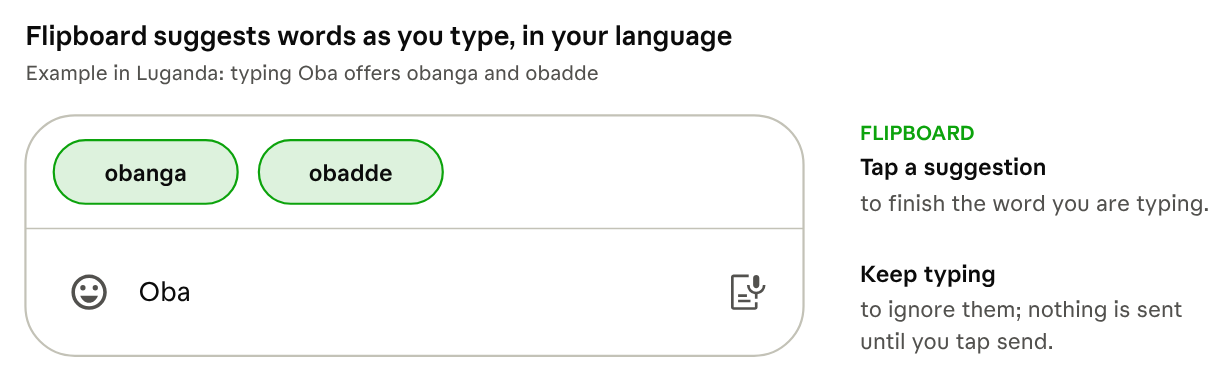
Flipboard, Youflip's own keyboard help. Most phone keyboards offer no help in local languages. Flipboard is built by Youflip so that every language in the app gets help as you type.
How it works. As you type, Flipboard looks up your words in Youflip's dictionary for the language you chose, and shows suggestions in a green bar above the message box.
Tap a suggestion to finish the word you are typing. Keep typing to ignore it. Nothing is sent until you tap send.
Red underline. If Flipboard does not know a word, it is underlined in red (see below).
It gets better over time. Words Flipboard does not know are counted without any name or account attached, and a person reviews them before they are added, so the suggestions improve for everyone.
Because Flipboard's dictionaries are still growing for local languages, a suggestion may be missing or not the word you meant.
The red underline. A word underlined in red is a word our dictionary for that language does not know yet. It may be misspelt, or it may be a correct word our dictionary is still missing, which is common in local languages. You can always send it as it is.
Translations are not perfect. Machine translation and voice-to-text can be wrong, especially for local languages, names, slang and mixed languages. Check important messages with the sender, and do not rely on a translation for contracts, legal, medical or money matters. To the fullest extent the law allows, Youflip is not liable for misunderstandings or losses caused by a translation or transcription.
Our commitment. We are improving our dictionaries and translations every day. Words the dictionary does not know are counted without any name or account attached (section 10), and a person reviews them before any word is added. We work with native speakers, language experts, and the relevant legal and cultural bodies for each language to make Youflip's languages better.
7. Marketplace: products, services and property
Every listing on Youflip (a product, a service, an apartment, a house, land or anything else) is posted and controlled by an independent seller, not by Youflip. Youflip is not a party to any sale, rental or agreement made through it.
What can be listed
| Group | Categories | Extra rules for this group |
|---|---|---|
| Products | Phones and electronics; computers and accessories; fashion, shoes and bags; beauty and personal care; home, furniture and appliances; building materials and hardware (iron sheets, cement, steel, paint, tools); vehicles, motorcycles and spare parts; food, drinks and groceries; agriculture, seeds and livestock; baby and kids; sports and leisure; books and stationery; health and wellness products; other items | The seller must own the item or be allowed to sell it. Vehicles need valid ownership papers. Food, health and beauty products must be safe, in date and allowed for sale. |
| Service providers | Repairs and maintenance; building and construction; transport, delivery and moving; cleaning; beauty, salons and barbers; events, catering and photography; tutoring and training; IT and design; professional services (legal, accounting, consulting); health and fitness; other services | The provider must hold any licence or qualification the law requires for that service. Youflip does not check qualifications. |
| Property | Apartments and houses for rent; houses for sale; land and plots; commercial property (shops, offices, warehouses); short stays and guest houses; real estate agents and dealers | The lister must be the owner or an authorised agent. Buyers and tenants should see the property and check the title or agreement before paying anything. Youflip does not currently collect deposits or rent. |
Items that are illegal where the seller or buyer is, or that break section 4, may not be listed in any category.
What sellers agree to
Everything they list is real, legal, theirs to sell or rent, and described honestly, with true photos and prices.
They deliver what they promised and follow the consumer, property and tax laws that apply to them.
Property listers confirm they own the property or are authorised to let or sell it.
Youflip may show their listings in the feed, in search and through Kaalo-Mate (section 9), and may use them to improve Youflip.
Advice to sellers
Honest listings sell. Buyers come back to sellers they trust, and one misleading listing can cost you every sale after it.
Use real photos and videos of the exact item, service or property you are offering, taken by you. Do not use pictures copied from the internet, another seller or a manufacturer's advert as if they were your own item.
Show it as it really is. Do not hide damage, defects or missing parts, and do not use filters or angles that make it look better than it is.
Describe it truthfully: the right condition (New, Used or Refurbished), size, quantity, location and what is included.
Set a real price and stick to it. Do not advertise one price to attract buyers and then ask for another.
Only list what you actually have and can deliver, or a property you are allowed to rent or sell.
Never ask for money for something you do not intend to deliver. Do not use listings to deceive, steal from or take money from buyers or the public.
Why it matters
Misleading listings lose sales and damage your reputation. Buyers can report, comment on and stop following dishonest sellers.
Youflip removes misleading listings and may limit or close the accounts behind them (section 21).
Lying to buyers to get their money is fraud in most countries. It can lead to police action and court cases, and Youflip provides its records to the courts when the law requires (see "Records we keep and give to courts" below).
What buyers should know
Youflip does not physically verify any product, property or seller, does not currently handle or hold payments, and does not guarantee quality, safety, delivery, ownership or legality.
Check the item or property in person where you can, meet in safe public places, and never pay in advance to someone you cannot verify.
Warnings in the app, ratings and "verified" badges help, but they are not a guarantee.
Losses, scams and disputes
To the fullest extent the law allows, Youflip is not liable for any loss, damage, scam, fraud or illegal dealing between buyers and sellers, or for any product, service or property listed by a seller. Any loss stays between the buyer and the seller, and disputes must be settled between them.
If you are scammed, report the account in the app and report the matter to the police. We will act on reports, including removing listings and closing accounts.
Records we keep and give to courts
We keep records of listings, account details we hold about sellers, and the documents sellers give us. When a court or another lawful authority asks us for them in a case, we will provide them as the law requires.
8. The Marketplace page
The Marketplace is the first page you see when you open Youflip. It shows listings from independent sellers near you and further away, one listing at a time, full screen. The rules for buying, selling and renting are in section 7.
What it shows
Products: things for sale, such as phones, clothes, furniture, food and building materials.
Services: people and businesses offering work, such as repairs, salons, transport, events and tutoring.
Property: apartments and houses for rent, houses for sale, land, and commercial property from owners and real estate dealers.
Moving through listings
Swipe up to see the next listing, and swipe down to go back to the one before.
The feed favours listings close to you and from sellers you follow. When someone you follow reposts a listing, it shows "Reposted by" with their name.
1. The top bar

| Icon | What it does |
|---|---|
| Youflip logo (the Y) | Youflip's mark; it shows you are on the Marketplace |
| Search | Find listings, sellers and categories by typing what you are looking for |
| Bell | Your Marketplace notifications; a badge shows new ones (section 14) |
| App language (A and 文) | Change the language Youflip is shown in (section 6) |
| Three dots | More options |
2. The location strip
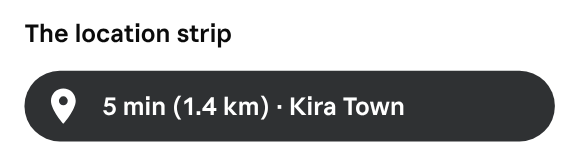
At the top of each listing, a dark strip shows how far the seller's area is from you, for example "5 min (1.4 km) · Kira Town". It never shows an exact address (section 15).
3. Name, condition and price
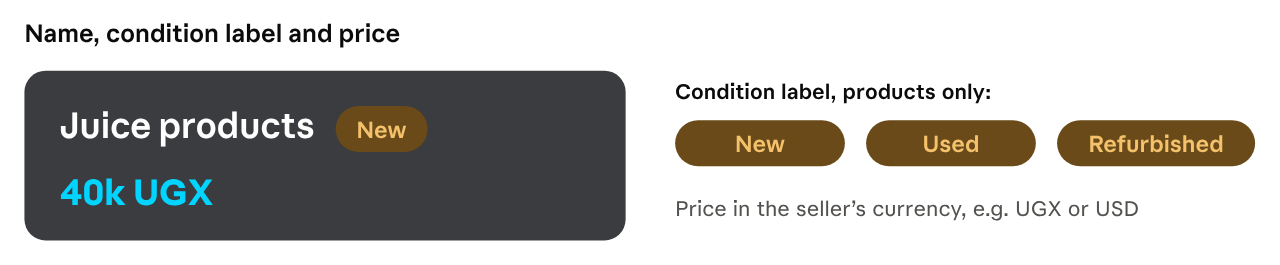
The name of the product, service or property is at the bottom left of the listing.
The condition label sits next to the name, on physical products only. It tells you what state the item is in:
| Label | What it means |
|---|---|
| New | Never used, in its original state |
| Used | Owned or used before; check its condition with the seller |
| Refurbished | Used before, then repaired or restored for sale |
How a seller adds it: when you post a physical product, you choose New, Used or Refurbished. Services and property have no condition label. Older product listings, made before the label existed, may show none.
The seller is responsible for choosing the true condition. Describing a used item as new is misleading and breaks section 7.
Prices and currencies
Products and property: the price is shown right under the name, in Youflip cyan. On the feed it is shortened (for example "40k UGX" for 40,000 Ugandan shillings); the full price shows when you open the listing.
Services: the price is given in the listing's description, often as a rate, for example per hour, per day or per job.
Currencies: when adding a listing, each seller chooses one of the 21 currencies below for its price; Ugandan shillings (UGX) are selected unless they choose another. The currency code is always shown next to the price. Youflip does not convert currencies; agree the final price and currency with the seller before you pay.
The 21 currencies sellers can choose
| Continent | Currency | Code | Shown as |
|---|---|---|---|
| Africa | Burundian Franc | BIF | BIF |
| Africa | Central African CFA Franc | XAF | FCFA |
| Africa | Congolese Franc | CDF | FC |
| Africa | Ghanaian Cedi | GHS | GH₵ |
| Africa | Kenyan Shilling | KES | KES |
| Africa | Nigerian Naira | NGN | ₦ |
| Africa | Rwandan Franc | RWF | RWF |
| Africa | South African Rand | ZAR | R |
| Africa | South Sudanese Pound | SSP | SSP |
| Africa | Sudanese Pound | SDG | SDG |
| Africa | Tanzanian Shilling | TZS | TZS |
| Africa | Ugandan Shilling | UGX | UGX |
| Africa | West African CFA Franc | XOF | CFA |
| Africa | Zambian Kwacha | ZMW | ZK |
| Africa | Zimbabwean Dollar | ZWL | Z$ |
| Asia | Chinese Yuan | CNY | ¥ |
| Asia | Indian Rupee | INR | ₹ |
| Asia | UAE Dirham | AED | AED |
| Europe | British Pound | GBP | £ |
| Europe | Euro | EUR | € |
| North America | US Dollar | USD | $ |
4. One action button
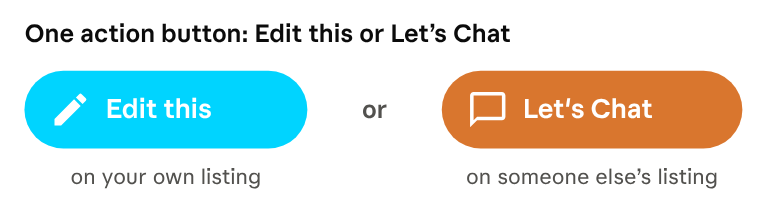
Each listing shows one of two buttons, never both:
Edit this (cyan, with a pencil) appears only on your own listings. Tap it to change the photos, name, price, description, condition or sound.
Let's Chat (orange) appears on other people's listings. Tap it to open a private chat with the seller about that listing. Your phone number stays hidden; the seller sees only your username (section 3).
5. The icons on the right side
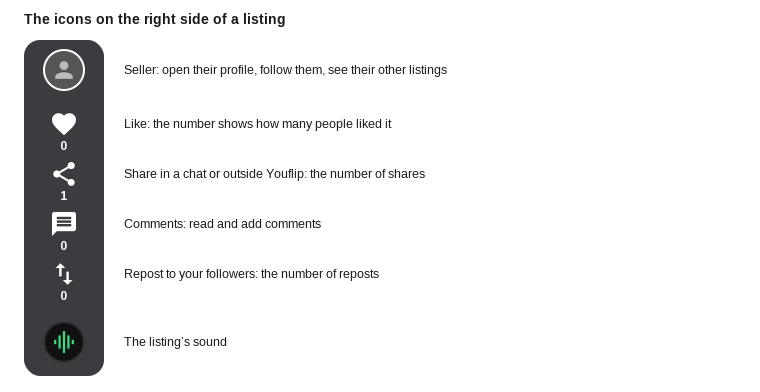
| Icon | What it does |
|---|---|
| Seller's picture | Opens the seller's profile, where you can follow them and see everything else they list |
| Heart | Like the listing; the number shows how many people liked it |
| Share | Send the listing to a chat, or share it outside Youflip; the number shows how many times it was shared |
| Comment | Read and write comments about the listing |
| Arrows (repost) | Repost the listing so your followers see it in their feed |
| Sound disc | The listing's sound (section 17) |
The sound on a listing
Many listings play a sound or voice-over. Tap the listing once to pause the sound. It stays paused, even as you look at other listings, until you tap again to play it. The sound also stops by itself while you swipe to the next listing.
6. The bottom navigation

| Button | What it opens |
|---|---|
| Marketplace | This page (highlighted in cyan when you are here) |
| Chats | Your one-to-one and group chats (section 10) |
| + (the round button) | Create something new, such as a listing |
| Calls | Your call history and new calls (section 11) |
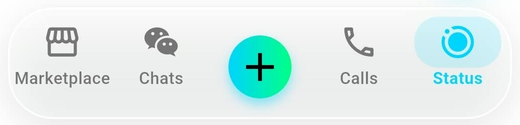
| Status | Your status and your contacts' statuses (section 13) |
9. Kaalo-Mate, the AI assistant
Kaalo-Mate is Youflip's AI assistant, powered by Pakalast AI. It answers questions, helps you find products, prices and places, and helps in conversations.

This is the Pakalast AI icon. Where you see it in Youflip, the answer comes from Kaalo-Mate's AI.
Our aim: your shopping aid
Kaalo-Mate is being built to become a shopping aid for everyone: it helps you compare products, prices, sellers and places, so you can make better shopping choices with more confidence. We intend Kaalo-Mate to become one of the best shopping aid tools on the market. It improves continuously, through the ongoing work of the Kaalo-Mate development team and the Pakalast AI development team. Kaalo-Mate helps you decide; the final decision, and any purchase, is always yours (see below).
Kaalo-Mate is an AI and can make mistakes. Its answers can be wrong, out of date or incomplete. Always check prices, availability, sellers and any important information yourself before you act on it.
Kaalo-Mate does not give professional advice. Nothing it says is legal, medical, health, financial, investment, tax, property, engineering or other professional advice, even when it answers questions on those subjects.
If you act on anything Kaalo-Mate says, you do so by your own decision and at your own risk.
Check its information thoroughly with a qualified expert in that field (a lawyer, doctor, accountant, surveyor, engineer and so on) before you rely on it.
To the fullest extent the law allows, neither Youflip nor Pakalast AI is liable for any problem, loss, injury or damage caused by using Kaalo-Mate's information.
Where its information comes from
Listings and prices posted by sellers on the Youflip Marketplace.
Public price lists and catalogues from manufacturers, shops and online stores, which we collect and check regularly. Some links may be partner links that pay Youflip a small fee; this does not change the price you pay.
General public information on the internet.
Your question, and the country you are in (worked out from your network, phone settings and time zone), so it shows shops and prices that apply to you.
Kaalo-Mate does not decide what any seller offers, and it does not check items physically. Section 7 applies to anything you buy after using it.
What happens to your questions
Your questions and Kaalo-Mate's answers are processed on Youflip's servers and our AI providers' servers to give you an answer. We may use them, without your name, to improve Kaalo-Mate. We do not sell them.
10. Chats, calls and media
One-to-one chats and groups
Chat with one person, or create a group to chat with many at once: from Chats, choose New group, add members from your contacts, and give the group a name and a picture.
Everyone in a group sees the other members' usernames and their messages in the group. Phone numbers stay hidden unless a member chooses to share theirs.
You choose who can add you to groups in Settings, Privacy, Groups.
Whoever creates a group is its admin. Admins can add or remove members and change the group's name and picture. You can leave a group at any time, mute it, or report it.
Group messages follow the same rules as all chats (section 4).
How to create a group
In any chat, tap the three dots at the top right, then New group. You can also start one from the new chat button or from Contacts.
Pick the people to add from your contacts.
Give the group a name and, if you like, a picture.
Create it. You become the group's admin, and everyone you added sees the new group in their chats.
The bar at the top of a chat
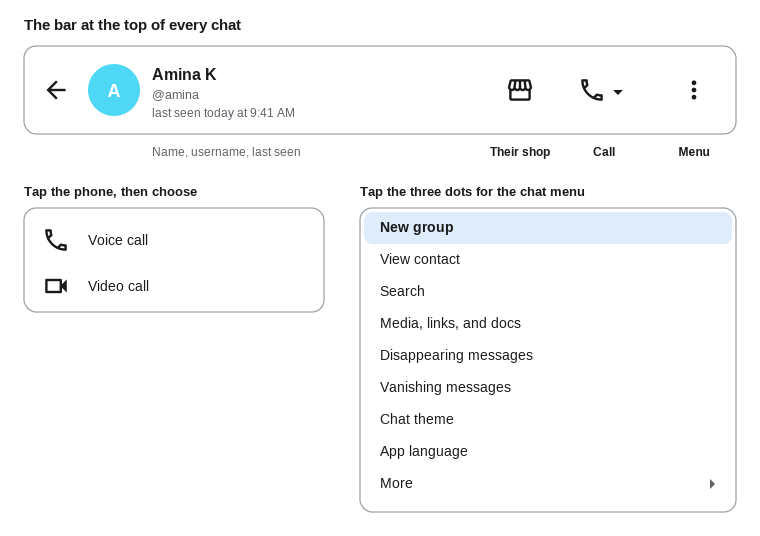
Back arrow returns to your chats.
Picture, name, username and last seen. Tap here to open the contact's info. You see "online" or their last seen only if their privacy settings allow it (section 15).
Their shop (the store icon). It shows only when this person sells on the Youflip Marketplace: products, services, or property such as rentals, houses and land. Tap it to see everything they have listed. If they list nothing, the icon does not appear. Their listings are their own; section 7 applies to anything you buy.
Call (the phone with an arrow). Tap it and choose Voice call or Video call (section 11).
Menu (the three dots):
New group: start a group (see above).
View contact: their profile, shared media, and options such as Lock chat, Block and Report.
Search: find words in this chat.
Media, links, and docs: every photo, video, link and document shared in this chat, in one place.
Disappearing messages and Vanishing messages: turn them on or off for this chat (below).
Chat theme: give this chat its own colours and wallpaper (section 18).
App language: change the language Youflip is shown in (section 6).
More: further options for this chat, such as clearing it.
Ticks and the online dot
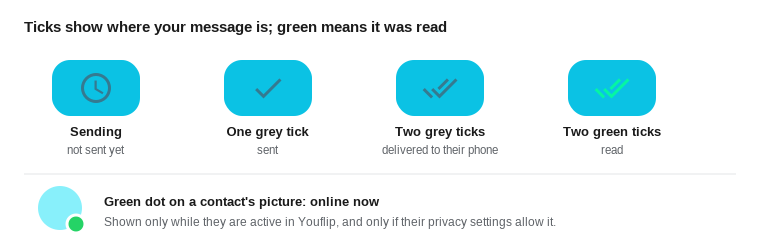
A clock means your message is still sending. One grey tick: sent. Two grey ticks: delivered to the other phone. Two green ticks: read.
If you turn off Read receipts (Settings, Privacy), you will not send or see read ticks in one-to-one chats. Read receipts are always sent in groups.
The green dot shows a contact is using Youflip right now. It turns off within about 3 minutes after they leave. Who can see your own dot and your last seen is set in Settings, Privacy (section 15).
Vanishing and disappearing messages
| Vanishing messages | Disappearing messages | |
|---|---|---|
| When a message goes | After it is read: when the reader leaves the chat, or 15, 30, 45 seconds or 1 minute after they open it | A set time after it is sent: 24 hours, 7 days or 90 days |
| If it is never read | Deleted after 7 days | Deleted when the time runs out |
| Who turns it on | Either person in the chat; both see a note in the chat | Either person in the chat; both see a note. You can also set a default timer for new chats in Settings, Privacy |
| Where it is deleted | From both phones and from our servers | From both phones and from our servers |
Screenshots of vanishing messages are blocked on Android, as with view-once photos. Anyone can still photograph a screen with another device, so only send what you trust the other person with.
Locked chats
Lock any chat from its contact info (Lock chat). Locked chats leave the chat list and move into a Locked chats folder that opens only with your phone's fingerprint, face or screen lock.
Notifications from locked chats do not show the message.
You can hide the folder completely and reveal it by typing your own secret code in the chat search.
Chat locks stay on that phone only. They are removed when you sign out.
Encryption
Messages are encrypted while they travel between your phone and our servers, and encrypted again when stored on our servers.
Youflip messages are not end-to-end encrypted. This lets features like chat translation, delivery to all your linked devices and safety reports work. Strict access rules mean only the people in a chat can open it; no other user, and no Youflip support tool, can read it.
Calls are encrypted directly between the phones in the call, so Youflip cannot listen to or watch them (section 11).
Your phone is the main home of your chats. Messages, photos, videos and voice notes are kept on your phone. Our servers only pass them on and hold them for a limited time, as shown below.
Types of messages and how to send them
All message types are sent from the bar at the bottom of a chat. The paperclip opens the attachment menu.
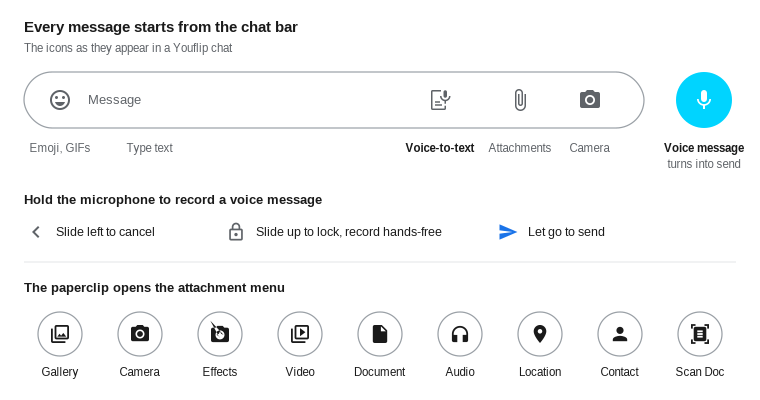
| Message | How you send it | How it is kept private |
|---|---|---|
| Text | Type in the message box and tap the send arrow. | Encrypted while it travels; only the people in the chat can read it. |
| Voice message | Tap the microphone to record, then send. Or hold the microphone to record and let go to send; slide left to cancel, slide up to lock and record hands-free. | Kept on the phones in the chat; deleted from our servers after delivery. |
| Voice-to-text | Tap the voice-to-text button in the message box and speak; your words are typed for you to check before sending (section 6). | The recording is not kept. |
| Photos | Paperclip, then Gallery or Camera; Effects adds filters and effects. | Kept on the phones; deleted from our servers after delivery. |
| Videos and video notes | Paperclip, then Video; or record a short video note in the chat. | Kept on the phones; deleted from our servers after delivery. |
| Documents | Paperclip, then Document, or Scan Doc to scan paper with your camera. | Kept on the phones; deleted from our servers after delivery. |
| Audio files | Paperclip, then Audio. | Kept on the phones; deleted from our servers after delivery. |
| Location | Paperclip, then Location. | Shared only when you choose to send it (section 15). |
| Contact | Paperclip, then Contact. | Shares only the contact you pick. Only share someone's details with their permission. |
| Emoji, GIFs and stickers | Tap the smiley in the message box. | Like text. |
| Listings and links | Share a Marketplace listing or paste a link. | Like text. |
Pressing and holding a message
Press and hold any message in a chat to select it. Youflip then shows three things at once: a selection bar across the top of the screen, a row of reactions, and a short menu beside the message. What you see depends on the type of message. The pictures here use placeholders, not real photos of people.
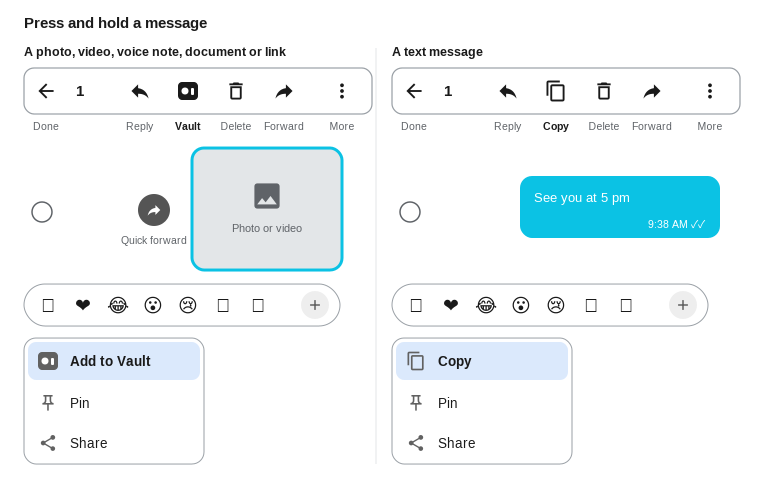
The selection bar. The number shows how many messages you have selected. Tap other messages to add them, and act on them all together. From left to right: the back arrow (Done) ends the selection; Reply answers the message; the second icon is Vault for a photo, video, voice note, audio file, document or link, and Copy for a text message; Delete removes it; Forward sends it to another chat; and the three dots open more options for the selected message, such as message info, and Edit for a message you can still edit.
The reactions row. React with 👍 ❤️ 😂 😮 😢 🙏 or 🤔. The + at the end opens every emoji.
The short menu. For a photo, video, voice note, audio file, document or link: Add to Vault, Pin and Share. For a text message: Copy, Pin and Share. Pin is not available yet; tapping it shows "coming soon".
Quick forward. Beside a photo or video, a round arrow sends it on without opening any menu.
The selection circle. An empty circle at the left marks a message you can select; it fills in once the message is selected.
What goes to the Vault from a chat. Photos, videos, voice notes, audio files, documents (including scanned documents) and links can be added to your Vault. Text messages cannot. To keep the words of a text message, copy them. Section 12 explains the Vault in full.
Opening a photo or video full screen
Tap a photo or video to open it full screen.
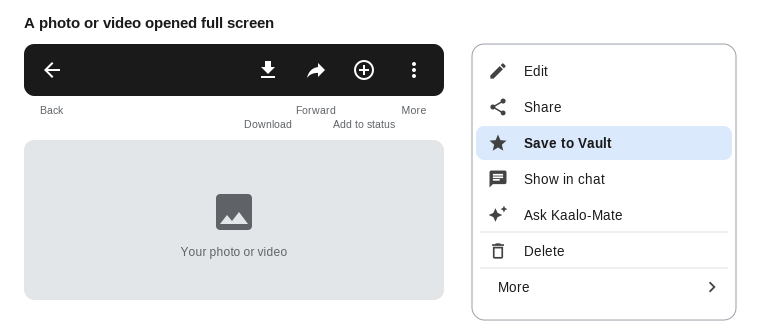
Back returns to the chat.
Download saves a copy to your phone.
Forward sends it to another chat.
Add to status posts it to your Status (section 13).
The three dots open a menu: Edit, Share, Save to Vault, Show in chat (takes you to the message in the conversation), Ask Kaalo-Mate (section 9), Delete, and More for further options. Some items appear only when they apply to that message.
Extra privacy choices
View once. A photo or video sent as "view once" can be opened one time only and then disappears. On Android, screenshots and screen recording are blocked while it is open.
Disappearing messages. Turn them on in a chat, and messages are deleted from the chat and from our servers after the time you choose.
Vault. Keep starred messages and your own files in your private Vault (section 12).
Calls. Voice and video calls show in the chat history; calls are not recorded.
Security
Messages and calls are encrypted while they travel between your phone and our servers.
Only you and the people in a chat can read it. Other users, and Youflip support staff through their tools, cannot.
Messages can only be sent from a signed-in, trusted device, so nobody can send messages as you from another phone.
Voice and video calls are connected between the people in the call. Youflip does not record calls.
Voice typing and live words turn your speech into text on Youflip's own servers. We keep the length of the recording and the language for statistics, not the recording itself.
Protect your personal information
Do not share your personal information in chats with strangers, or with anyone you do not know personally. This includes:
your real full name, phone number and email address;
where you live or work, your daily movements and your live location;
photos of your ID, passport, bank cards or documents;
bank, mobile money or card details, PINs, passwords and verification codes;
details about your family and children.
Youflip protects your number and identity by showing only your username (section 3). If you choose to share personal information in a one-to-one or group chat, you do so at your own discretion and risk. To the fullest extent the law allows, Youflip is not liable for any harm, damage, loss of money or property, injury or loss of life that results from personal information you chose to share. We strongly advise you not to share it in private chats unless you know and trust the person.
How long media stays on our servers
Once media is deleted from our servers, it can only be found on the phones that received it. If you lose your phone without a backup, we cannot recover your chats.
Backing up your chats
To keep your chats and files for the long term, back them up to your own Google account (Gmail) from Youflip's settings. You choose whether to back up and when.
The backup is kept in your Google account, not on Youflip's servers, and Google's terms apply to it.
Anyone who can sign in to your Google account may be able to reach your backup, so protect it with a strong password and two-step verification.
To move to a new phone, sign in to Youflip and restore from the same Google account.
For important documents and files you want to keep inside Youflip, use your Vault (section 12).
Words you type. To improve spell check and suggestions in local languages, the app may count words its dictionary does not know. Only the word, its language and how often it was seen are recorded, with no name or account attached. A person reviews them before any word is added.
11. Audio and video calls
You can make free voice and video calls to anyone on Youflip, from a chat or from the Calls tab. Youflip never records, stores, listens to or watches your calls.
How to place a call
There are three ways to start a voice or video call on Youflip. Names in the pictures below are examples, not real people.
1. From the Calls page
Tap Calls in the bar at the bottom of the app.
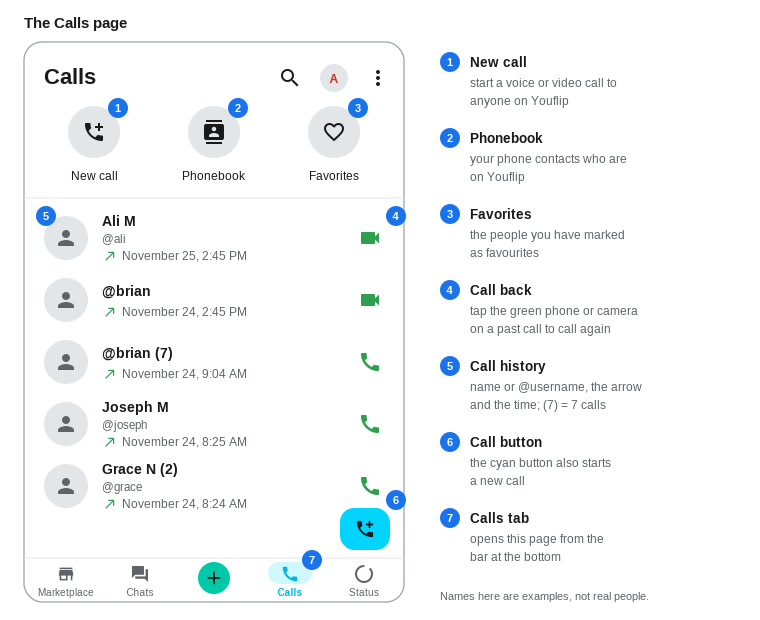
New call (or the cyan call button at the bottom right) starts a voice or video call to anyone on Youflip.
Phonebook shows your phone contacts who use Youflip, so you can call one of them.
Favorites shows the people you have marked as favourites, for quick calling.
Your call history lists every call: the person's name or @username, an arrow showing the direction of the call, and the date and time. A number in brackets, such as (7), means several calls with that person have been grouped together.
Call back by tapping the green phone (voice) or green camera (video) on the right of any past call.
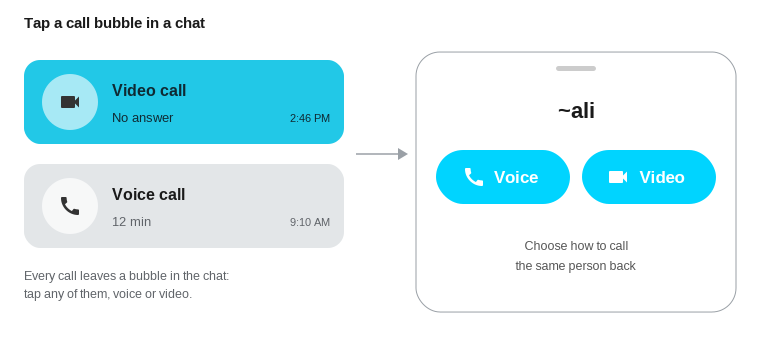
2. From a call bubble in a chat
Every call leaves a bubble in your chat with that person, such as "Video call, No answer" or "Voice call, 12 min". Tap the bubble, then choose Voice or Video.
3. From the bar at the top of a chat
Open the chat, tap the phone icon in the bar at the top, and choose Voice call or Video call from the small menu. This bar is shown and explained in section 10, The bar at the top of a chat.
What you see during a video call
The faces in these pictures are drawn illustrations, not real people.
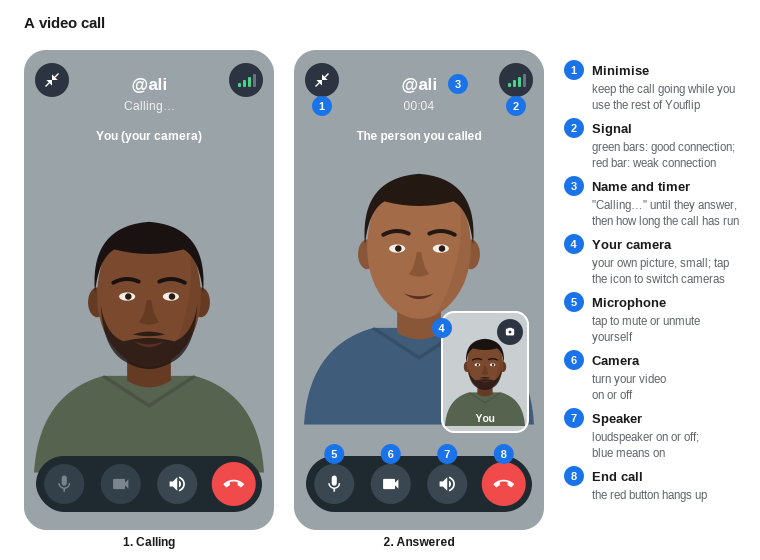
While calling. Your own camera fills the screen, with the other person's name and "Calling…" at the top. The microphone and camera buttons stay dimmed until the call is answered.
Once answered. The other person fills the screen and the timer starts counting. Your own picture moves to a small window; tap the switch icon on it to change between your front and back cameras.
The buttons along the bottom: microphone (mute or unmute yourself), camera (turn your video on or off), speaker (loudspeaker on or off) and the red button to end the call.
At the top: the minimise button on the left, and the signal indicator on the right. Green bars mean a good connection; a single red bar means the connection is weak and sound or video may break up.
What you see during a voice call
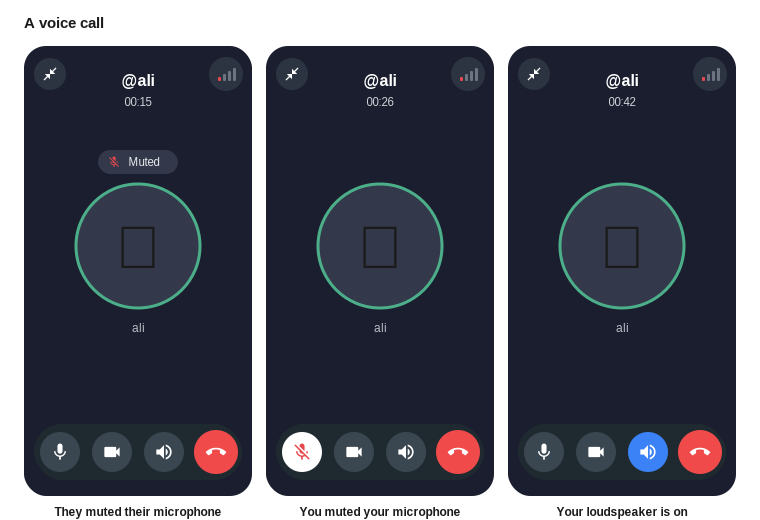
The circle in the middle shows the profile picture of the person you are calling, the one receiving the call. If they have no profile picture, the first letter of their name is shown instead. Their name or username is under it, and the call timer is at the top.
When the other person mutes their microphone, a small Muted label appears above their picture on your screen, so you know they cannot be heard until they unmute. The call itself carries on.
When you mute yourself, your microphone button turns white with a red line through it. The other person sees the Muted label on their screen. Tap the button again to unmute.
When you turn on the loudspeaker, the speaker button turns blue. Tap it again to go back to the earpiece.
The camera button lets you switch a voice call to video, and the red button ends the call.
Minimising a call
Tap the minimise button at the top left of the call screen to keep the call going while you use the rest of Youflip, for example to read or reply in the chat.
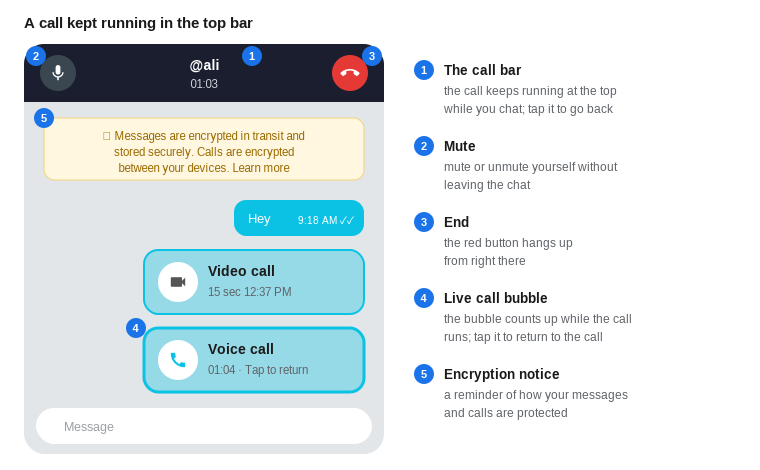
The call bar stays at the top of the screen with the person's name and the call timer. Tap it to go back to the full call screen.
Mute and end are in the bar itself: the microphone on the left mutes or unmutes you, and the red button on the right ends the call.
The live call bubble in the chat counts up while the call runs (for example "Voice call, 01:04 · Tap to return"). Tap it to return to the call.
The notice at the top of the chat reminds you that messages are encrypted in transit and stored securely, and calls are encrypted between your devices.
Whichever way you start it, the call is connected and protected in exactly the same way, as explained below.
How a call is connected
Youflip calls use WebRTC, the open, widely used standard for secure real-time calls on the internet.
When you call someone, Youflip's servers let their phone know a call is coming and help the two phones find each other. These servers only pass on who is calling, ringing and hanging up, never the sound or picture.
The two phones then connect to each other and send the sound and video directly between them wherever the network allows.
If a network blocks a direct path (some mobile and office networks do), the call goes through a relay server. Youflip gives your phone short-lived access to the relay for each call, and the relay only forwards the call in its locked, encrypted form. It cannot open it.
Group calls. In a group call, each phone connects directly to every other phone in the call, in the same encrypted way as a one-to-one call. There is no central media server that mixes or opens the call, so the same promises apply: Youflip cannot listen to, watch or record a group call.
How calls are protected
Every call is encrypted from one phone to the other with the security built into WebRTC (DTLS and SRTP). The keys that unlock the call are created on the two phones for that call only, and never leave them.
Because of this, nobody in between, including Youflip, our relay servers or your internet provider, can listen to the sound or see the video.
Youflip has no tool to record, replay, watch or listen to a call, and we never store the sound or video of any call.
What Youflip does keep about a call
A call record: who called whom, when, whether it was voice or video, how long it lasted, and whether it was answered, missed or declined. You see it in the Calls tab and in your chat with that person.
We keep this record to show your call history and to deliver missed-call notifications (section 14).
Your controls
Silence unknown callers (Settings, Privacy, Calls): calls from people not in your contacts do not ring, but still appear in your Calls tab and notifications.
Blocked contacts cannot call you.
You choose when to turn your camera and microphone on during a call, and Youflip needs your permission to use them (section 15).
Please note
The other person can still record your call with another device or app outside Youflip. Only say and show what you are comfortable with.
Calls use your mobile data or Wi-Fi; your network provider's charges apply.
Youflip calls are not a replacement for phone calls to emergency services. In an emergency, use your phone's normal dialler.
12. Your Vault
The Vault is your private storage space inside Youflip, for personal files and messages you want to keep. Only you can see it.
What you can keep in it
Saved messages. Press and hold a photo, video, voice note, audio file, document or link in a chat and tap Add to Vault, and it is kept in your Vault. Text messages are not added.
Your own uploads. Add photos, videos and documents straight from your phone, such as copies of personal documents you want to keep safe.
Your phone contacts (optional). Turn on contact backup to keep a copy of your phone's address book in the Vault. You can turn it off at any time.
Each account has 500 MB of Vault storage, and the Vault shows how much you have used.
How to add a message to your Vault
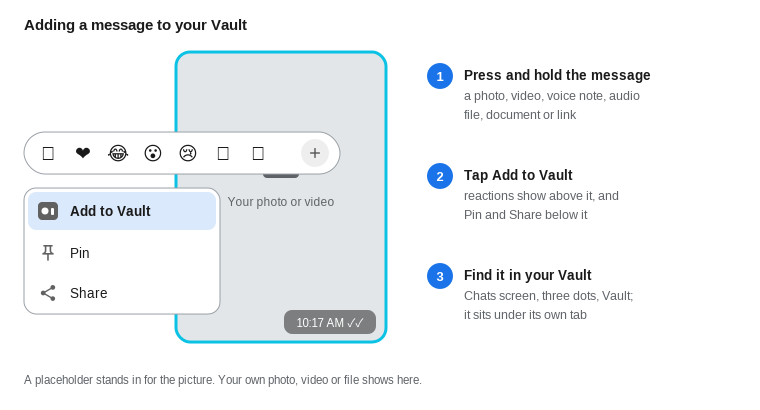
In the chat, press and hold the photo, video, voice note, audio file, document or link you want to keep.
The reactions appear above it and a short menu below it. Tap Add to Vault. (You can also tap the Vault icon in the selection bar at the top.)
To find it, open the Chats screen, tap the three dots, then Vault. The item is under its own tab.
You can also add files straight from your phone: in the Vault, tap + and choose Take photo, Record video, Photos and videos, Documents, or Audio files.
Which messages go to the Vault
| Message type | Added to the Vault? | Where you find it |
|---|---|---|
| Photos | Yes | Photos tab |
| Videos | Yes | Videos tab |
| Voice notes and audio files | Yes | Audio tab |
| Documents, including scanned documents | Yes | Docs tab |
| Links | Yes | Links tab |
| Your phone contacts | Yes, when contact backup is on | Phonebook tab |
| Text messages | No | — |
Text messages are not added to the Vault, because the Vault is for files and links. To keep the words of a text message, copy them into a note or document, then add that document.
How your Vault is labelled
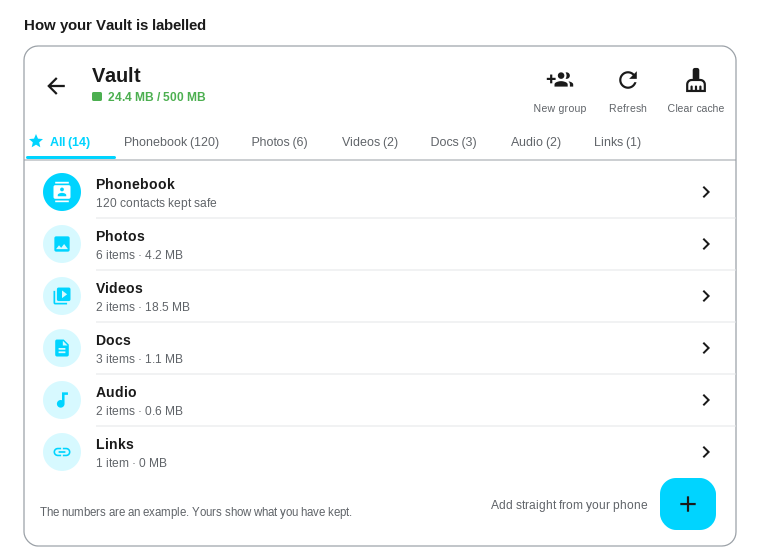
At the top: the word Vault and, under it, how much of your 500 MB you have used.
The three icons: New group starts a new group chat; Refresh reloads the Vault; Clear cache clears pictures saved for a while on this phone to load faster. Clearing the cache does not remove anything from your Vault.
The tabs: All, Phonebook, Photos, Videos, Docs, Audio and Links, each with the number of items in it.
The All tab lists every category with its number of items and the space it uses. Tap a row to open that tab.
The + button adds files straight from your phone.
The picture uses example numbers and no real photos.
Your Vault survives a lost phone or number. Unlike the Google (Gmail) backup, the Vault is kept on Youflip's own servers. If you lose your phone, or even your phone number, everything in your Vault is still there, whether or not you ever made a Google backup. It comes back to you once you lawfully and successfully recover your Youflip account.
| Your Vault | Google (Gmail) backup | |
|---|---|---|
| Where it is kept | Youflip's own servers | Your Google account, a third-party service |
| Who protects it | Youflip, directly, under these terms | Google, under Google's terms and conditions |
| If you lose your phone or number | Restored when you recover your Youflip account | Restored only if you can sign in to that Google account |
| What it holds | Saved photos, videos, audio, documents and links; your uploads; contacts if turned on | The chats and files you chose to back up |
The Vault is the storage Youflip protects fully and directly, which is why we recommend it for the personal documents and files that matter most to you.
How the Vault is protected
Your Vault belongs to your account alone. No other user, contact or group can see it, and nothing in it is shared unless you choose to forward or share it.
It can only be opened from your signed-in, trusted devices (section 16).
Its contents are stored encrypted on Youflip's servers, and the same access rules that protect your chats protect your Vault.
Youflip support staff cannot open your Vault.
Items in your Vault are kept until you delete them. Ordinary message clean-up and disappearing-message timers do not remove them.
Using the Vault safely
Turn on App lock (section 16) and keep your phone locked, so nobody who picks up your phone can open Youflip or your Vault.
Store only what you need. For very sensitive documents (passports, bank statements, title deeds), also keep the originals somewhere safe outside Youflip.
Do not store anything illegal or anything you do not have the right to keep, such as other people's private files.
If you close your Youflip account, your Vault is deleted with it. Download anything you want to keep first.
To the fullest extent the law allows, Youflip is not liable for the loss of Vault contents caused by events outside our control, or by someone using your unlocked phone (section 20).
13. Status
Status lets you share a photo, a video or a coloured text update with your contacts for a time you choose. Open it from the Status tab at the bottom of the app.
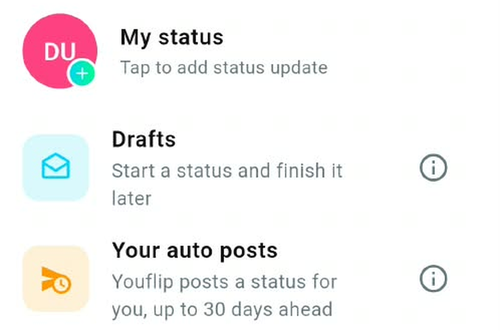
At the top of the Status screen you find My status (tap to add a status), Drafts (the blue envelope) and Your auto posts (the orange clock). Tap the ⓘ beside Drafts or Your auto posts for a short explanation in the app.
What you can post
Photo: take one with the camera or choose from your photos.
Video: up to 30 seconds.
Text: your words on a coloured background.
Before anything goes out, you see a preview showing how it will look. Tap Edit to change it, or post it.
How long a status stays up
| You choose | Status stays visible for |
|---|---|
| 24 hours (the default) | 1 day |
| 48 hours | 2 days |
| 3 days | 3 days |
| 5 days | 5 days |
| 7 days (the longest) | 7 days |
You can change the duration of a live status, or delete it at any time. When its time runs out, the status is removed from Status and deleted from our servers.
Drafts
If you start a status and leave without posting it, or it cannot be posted, it is saved as a draft. Drafts are kept on your phone only, never on our servers, and are listed under Drafts on the Status tab. Open a draft to finish and post it, or delete it.
Auto posts (scheduled statuses)
An auto post is a status Youflip posts for you at a time you choose.
Choose Auto-post later, then pick a date and time between 10 minutes and 30 days ahead, and how long it should stay up.
Your auto posts are listed under Your auto posts on the Status tab, where you can preview, reschedule or cancel them until they go live.
Before it goes live, Youflip sends you a notification 5 minutes before it goes live, so you can still change or cancel it. You are notified again the moment it is posted.
If an auto post cannot be posted (for example, a connection problem), Youflip tries again several times. If it still fails, you get a notification, it is marked as failed, and you can retry it with a new time.
The people who see an auto post are worked out again each time you open Youflip, so it reaches the right contacts even if your contacts change before it goes live.
An auto post is your post: you are responsible for it, exactly as if you had posted it yourself at that moment. Check it still makes sense when it goes live.
Who sees your status
| Choice | Who sees it |
|---|---|
| My contacts | Your contacts on Youflip |
| My contacts except… | Your contacts, except people you pick |
| Only share with… | Only the people you pick |
People who see your status can reply to it; a reply arrives as a private message in your chat with them.
You can see who has viewed your status.
Anyone who can see your status can take a screenshot of it, so only post what you are happy for them to keep.
Conditions
Statuses follow the community rules (section 4). Do not post anything illegal, harmful, misleading, or that you do not have the right to share.
Do not post other people's private information or images without their permission (section 10).
Using Status to sell? The Marketplace rules apply (section 7).
We may remove a status that breaks these terms, and limit Status for accounts that keep breaking them.
14. Notifications
Youflip sends notifications so you do not miss messages, calls, your statuses and Marketplace activity. You control them in your phone's settings, and you can mute any chat.
Chat messages
Each notification shows who sent it and the message. The name is the one saved in your phone contacts, or else their Youflip username. Your phone number is never shown to others.
In a group, it shows the group name and "Sender: message".
Photos and videos show as "Photo" or "Video" with a small preview.
Expand a notification to see up to 6 recent messages from that chat. Several chats are grouped into one summary, such as "3 messages from 2 chats".
If you use chat translation, the notification can show the message in your language.
Act straight from the notification: Reply, Mark as read or Mute. Notifications for a chat clear when you open it.
Incoming calls
An incoming voice or video call rings on your screen with Accept and Decline, even when your phone is locked.
As soon as the call reaches your phone, the caller sees "Ringing" instead of "Calling…".
If you miss or decline a call, you get a missed-call notification with Call back and Message.
Answered calls do not leave a notification; they are recorded in the chat instead.
Outgoing calls
When you call someone, your screen shows "Calling…" while Youflip reaches them, "Ringing" once their phone rings, and the call timer once they answer.
If they do not answer, the call is recorded in your chat as not answered.
Status
A reminder 5 minutes before an auto post goes live, a notification when it is posted, and one if it fails (section 13).
Marketplace
Marketplace notifications are collected under the bell icon at the top of the Marketplace. Tap the bell to see them; a badge shows when there are new ones.

Privacy of notifications
Notifications can show message text on your lock screen. To hide it, turn off notification previews on the lock screen in your phone's settings.
Notifications reach your phone through Google's (Android) or Apple's (iPhone) notification services, as they do for every app.
Muting a chat stops its notifications; the messages still arrive in the chat.
15. Your data and your location
How we keep your data. Your account and listings are stored on Google Cloud (Firebase) servers. Security rules make sure each person can only reach their own data and the chats they are in. Every change to those rules is tested before it goes live, and refused requests are watched around the clock. We do not sell your personal data.
Your location
Privacy settings
In Settings, Privacy, you decide who sees what about you:
| Setting | Choices | Starts as |
|---|---|---|
| Last seen | Everyone, My contacts, My contacts except…, Nobody | My contacts |
| Online (the green dot) | Everyone, or the same as Last seen | Everyone |
| Profile photo | Everyone, My contacts, My contacts except…, Nobody | Everyone |
| About | Everyone, My contacts, My contacts except…, Nobody | Everyone |
| Links you share | Everyone, My contacts, My contacts except…, Nobody | Everyone |
| Status | My contacts, My contacts except…, Only share with… | My contacts |
| Groups (who can add you) | Everyone, My contacts, My contacts except… | Everyone |
| Read receipts | On or off (always on in groups) | On |
| Default message timer | Off, 24 hours, 7 days or 90 days for new chats | Off |
| Silence unknown callers | On or off | Off |
| Blocked contacts | People you block cannot call or message you | None |
Your privacy choices are saved with your account and apply on all your devices. Your contacts list is used only as account IDs, never phone numbers, to check who counts as "My contacts".
Requesting or deleting your account
You can request a copy of your account information, or delete your account, in Settings, Account.
Deleting your account removes your profile, your chats on our servers and your Vault, and cannot be undone.
Maps, places and directions in Youflip are powered by Google Maps.
Youflip uses your location only when you allow it in your phone settings, and only for the feature you are using, such as nearby listings or sharing a place.
We never share your location with other users unless you choose to share it, for example by sending your location in a chat. You can stop sharing at any time.
Without location permission, Kaalo-Mate and the Marketplace use only your country (section 9).
Distance on listings. When you allow location, a listing shows how far the seller's area is from you, for example:

This means about 5 minutes away (1.4 km) in Kira Town. It shows only the travel time, the distance and the general area, never the seller's exact address, and the seller never sees where you are.
Phone permissions
Youflip asks your permission before it uses your contacts, location, camera, microphone, photos or notifications. Each request comes from your phone's own permission prompt, and you can change your answer at any time in your phone's settings. We use each permission only for the features below.
| Permission | What Youflip uses it for | If you do not allow it |
|---|---|---|
| Contacts | Show your contacts' names, find which of your contacts use Youflip, set who sees your status, and the optional phonebook backup in your Vault | Chats show usernames instead of names, you cannot easily find friends, "My contacts" for Status does not work properly, and contact backup is off |
| Location | Nearby listings, distance on listings, maps and directions (Google Maps), and sending your location in a chat | No nearby listings or distances; maps and location sharing do not work; Kaalo-Mate and the Marketplace use only your country |
| Notifications | Messages, incoming calls, status reminders and Marketplace alerts (section 14) | You will not be alerted to new messages or calls, and may miss incoming calls |
| Microphone | Voice messages, voice and video calls, and voice-to-text | You cannot record voice messages, speak in calls or use voice-to-text |
| Camera | Photos, videos, video calls, Status and Scan Doc | You cannot take photos or videos in Youflip or turn on your camera in calls |
| Photos and media | Sending photos, videos and files, and saving media you receive | You cannot attach media from your phone or save what you receive |
| Full-screen alerts (Android) | Showing incoming calls on your screen when the phone is locked | Calls may only show as a small notification and are easier to miss |
Saying no to a permission does not close your account, but the features that need it will not work properly until you allow it. Youflip never uses a permission in the background for anything other than the feature you are using, and never sells what it learns from them.
Who else sees your data
We share data only with the services that run Youflip (such as Google Cloud, Google Maps and our AI and messaging providers), under contracts that protect it, or when a court or other lawful authority requires it. We do not give anyone else access, and no government has special access to Youflip.
16. Security
Security is built into every part of Youflip. This section brings together how we protect your account, your chats and your data, and what you can do to stay safe.
App lock
Turn on App lock (Settings, Security) so that Youflip, including your chats and Vault, only opens with your PIN or fingerprint.
You set a 4-digit PIN, and can also unlock with your fingerprint or face if your phone supports it.
Choose when Youflip locks after you leave it: immediately, after 1 minute, after 5 minutes or after 30 minutes.
Your PIN is stored only on your phone, in the phone's secure storage. Youflip never receives it, so we cannot tell you your PIN; if you forget it, you will need to verify your account again.
You can change your PIN or turn App lock off at any time, after entering your current PIN.
Locked chats add a second layer for individual chats (section 10).
Linked devices
Use your Youflip account on a computer as well as your phone (Settings, Linked devices).
To link a computer, open youflip.app in its web browser and scan the QR code shown there with Youflip on your phone.
Linked devices are listed with their name, browser and last activity. Tap one to rename it or log it out.
Only devices you link yourself can reach your account. If you see a device you do not recognise, log it out at once and contact us.
Chat locks stay on your phone and do not apply on linked devices; log out of shared computers when you finish.
Your account
Sign-in codes. Each sign-in on a new device needs a one-time code sent to your phone number. Youflip staff will never ask for it.
Email for security. Your email lets us confirm it is really you, help you recover your account, and alert you to new sign-ins and security changes.
Two-step verification. Turn it on so that your number alone is not enough to take over your account.
Trusted devices. Only phones and web sessions you have signed in on can reach your account. A sign-in on a new phone can end older sign-ins, so a lost or sold phone loses access.
Username only. Other users see your username, never your phone number (section 3).
Your chats and calls
Messages and calls are encrypted while they travel.
Only the people in a chat can read it, and messages can only be sent from a signed-in, trusted device.
Photos, videos and voice notes are kept on your phone and deleted from our servers after delivery (section 10). Youflip does not record calls.
Your data on our servers
Your data is stored on Google Cloud servers and encrypted when stored.
Strict access rules let each person reach only their own data and the chats they are in. Every change to these rules is checked by automatic tests before it can go live, and older versions can be restored within minutes.
Our systems are watched around the clock. Unusual activity, such as a sudden rise in refused requests, alerts our team straight away.
Youflip staff get only the access their job needs. Customer care tools cannot read messages or private data.
Passwords and keys that run our services are kept in a secure vault, never in the app, and are changed when needed.
Voice recordings for voice-to-text are not kept, and your location is used only with your permission (sections 6 and 15).
Money and payments
Payments are not supported in Youflip yet. For now, Youflip does not take, hold or pass on payments, deposits or rent for listings; any payment is made directly between buyer and seller, at their own risk. We plan to offer payments in future, and will tell you and update these terms before we do (section 7).
Youflip will never ask for your PIN, password, sign-in code, or bank or mobile money details, in a chat, a call, a text or an email.
What you can do
Keep your phone locked, and keep the Youflip app updated.
Never share your sign-in code, PIN or password with anyone, including people who say they work for Youflip.
Be careful with links and files from people you do not know, and with messages pretending to be from Youflip. We contact you only inside the app or from an official Youflip email address.
Do not share personal information with strangers (section 10).
Report suspicious accounts, listings and messages in the app.
If your phone is lost or stolen, sign in on a new phone as soon as you can to end the old sign-in, and contact us at support@youflip.app.
If something goes wrong
If a security problem affects your personal data, we will tell you and the relevant authorities as the law requires, and explain what we are doing about it. To report a security weakness in Youflip, write to support@youflip.app; please give us time to fix it before you share it publicly.
No system can be 100% secure. We work every day to keep Youflip safe, and section 20 explains the limits of our liability.
17. Sounds and music
Sellers can add a sound to a listing from three places, and each is credited on its sound page.
The sound page. Tap a sound on any listing to open its page:
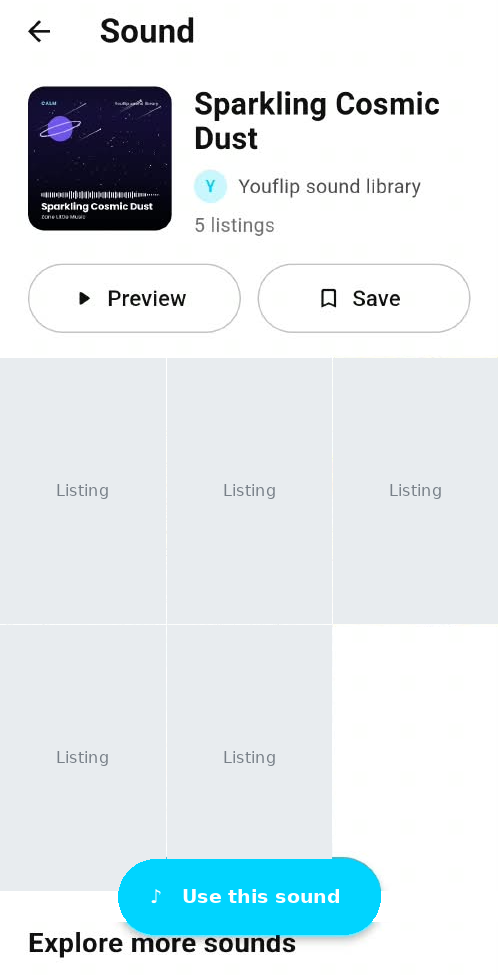
The top shows the sound's cover, its name and where it comes from. Library tracks say "Youflip sound library"; a seller's own recording shows the seller and the listing it came from.
The count shows how many listings use the sound (here, 5 listings).
Preview plays the sound; Save keeps it for later.
The grid shows the listings that use this sound, with their views.
Use this sound adds it to your own listing. The original creator stays credited, however many times it is reused.
Explore more sounds suggests other tracks.
| Sound | Who owns it | How it is credited |
|---|---|---|
| A track from the Youflip sound library | Its composer. The tracks are released as CC0 (public domain) and were collected from OpenGameArt.org | "Youflip sound library", the track name, the composer and a link to the original |
| Your own voice-over or recording | You | "Original sound" with your name and the listing it came from |
| "Use this sound" from another listing | The person who first recorded or added it | The original listing and its creator stay credited, however many times it is reused |
When you upload your own sound, you confirm it is yours or you have the right to use it, and you allow Youflip and other users to play it, show it, and reuse it through "Use this sound" inside Youflip.
Do not upload songs, beats or recordings owned by others (for example from radio, albums or other apps) unless you have their written permission.
Youflip does not claim ownership of library tracks. The composers keep their credit, and our records of each track's source are kept permanently.
If you believe a sound on Youflip uses your work without permission, contact us at support@youflip.app with a link to it. We will remove it while we look into the claim.
18. Themes, wallpapers and images
App and chat themes
You can change how Youflip looks, for the whole app or for one chat at a time.
Light and dark. Youflip has a light look and a dark look, and follows your phone's setting unless you choose one.
Chat themes. Pick a colour theme (cyan, pink, orange and others) for your chats. A theme changes the colour of your chat bubbles and the matching wallpaper together.
One chat, its own theme. In any chat, open the menu, then Chat theme, to give that chat its own theme and wallpaper. It overrides your general choice for that chat only. Reset to default to go back.
Wallpapers. Choose a wallpaper from Youflip's collection (below), a plain colour, or a photo of your own. Remove wallpaper to go back to none.
Who sees your theme. Themes and wallpapers change only what you see. The other person in the chat never sees your theme, and keeps their own.
Where your choices are kept. Your general theme is saved on your phone. A theme you set for one chat is saved with your account, so it follows you to a new phone. A wallpaper made from your own photo stays on the phone where you chose it, and is not uploaded.
You are responsible for photos you use as wallpapers: use only pictures you have the right to use.
The chat wallpapers in Youflip are photographs by independent photographers, published on Unsplash under the Unsplash License. Each wallpaper shows its photographer's name ("Photo: name · Unsplash") and links to the original photo.
The photographers keep their copyright. Youflip does not claim ownership of these photos.
You may use them as wallpapers inside Youflip. You may not download them from Youflip to sell, or collect them to build another wallpaper or photo service.
Youflip's own logo, icons, illustrations and designs belong to Youflip (section 19).
If you believe an image on Youflip uses your work without permission, contact us at support@youflip.app and we will remove it while we look into the claim.
19. Your content and our rights
You own your content. Photos, videos, listings, sounds and messages you share stay yours.
You allow us to use it to run Youflip. By posting public content (listings, sounds, posts), you give Youflip a free, worldwide licence to store, show, copy, translate and share it inside Youflip and in Youflip's own promotion, for as long as it is on Youflip. Private messages are only delivered, never used this way.
Youflip's own property. The Youflip name, logo, app, website, software, sound library collection, wallpaper collection and Kaalo-Mate belong to Youflip or its licensors. You may not copy, change or sell them.
Feedback. If you send us ideas or suggestions, we may use them without owing you anything.
20. Limits of our liability
Youflip is provided "as it is". We work to keep it safe and running, but we cannot promise it will always be available, error-free or secure.
To the fullest extent the law allows, Youflip, its owners, staff and partners are not liable for:
any loss, damage, scam, fraud or illegal dealing between users, including buyers, sellers, landlords, tenants and agents;
the quality, safety, legality, ownership or delivery of anything listed by a seller;
mistakes in Kaalo-Mate's answers, or decisions you make based on them;
content posted by other users;
loss of chats or media kept only on a phone that is lost, broken or reset;
indirect losses such as lost profit, business or data.
You agree to cover Youflip's costs if a claim is brought against us because of something you listed, sold, posted or did on Youflip in breach of these terms.
21. Suspension, changes, law and contact
Help and feedback. Go to Settings, Help:
Help Center: answers to common questions, including scams and safety.
Contact Customer Care: chat with the official Youflip Support account, shown with our logo and a verified tick. Youflip staff never ask for your sign-in code, PIN or password.
Send feedback: report a technical problem, with screenshots if you like. It reaches support@youflip.app with your app and phone details attached, so we can fix it faster.
Terms and Privacy Policy: these terms, also at youflip.app/terms.
Suspension and closing accounts. We may warn, limit, suspend or close an account that breaks these terms, puts others at risk, or where the law requires it. You can close your account at any time in Settings.
Changes to these terms. We may update these terms. We will show the date of the latest version at the top and tell you in the app about important changes. Using Youflip after a change means you accept it.
Contact. Questions, reports and copyright claims: support@youflip.app.